
Appearance
Managing Clients
Keep your client list accurate and up to date by managing each client's status directly from wherever you see them in Hidma.
Client Status
Every client has a status that controls whether they appear in your active lists. Out of the box there are two:
Active
- You're currently doing work for this client
- Appears in active client lists, filters, and reports by default
Inactive
- You're no longer actively working with this client
- Hidden from active lists but all historical data (bills, time, reports) is preserved
Custom statuses
Active and Inactive are the built-in statuses. If your organization needs additional statuses, Hidma can configure custom ones for your tenant — contact [email protected].
Don't delete — deactivate
When a relationship ends or an engagement finishes, mark the client Inactive rather than deleting them. Deleting can break historical reporting, whereas deactivating keeps the records intact while tidying your active list.
Changing a Client's Status
You don't need to open an edit form to change a client's status. The status indicator — the small coloured dot and status label (with a dropdown chevron) — is clickable anywhere a client appears:
- On each client card in the main Clients list
- On the client stats / summary view
- On the client's dashboard
To change the status:
- Find the client's status indicator (the coloured dot + status label, e.g. 🟢 Active).
- Click the indicator — hovering shows a tooltip such as "Change the status by clicking here."
- Select the new status from the dropdown.
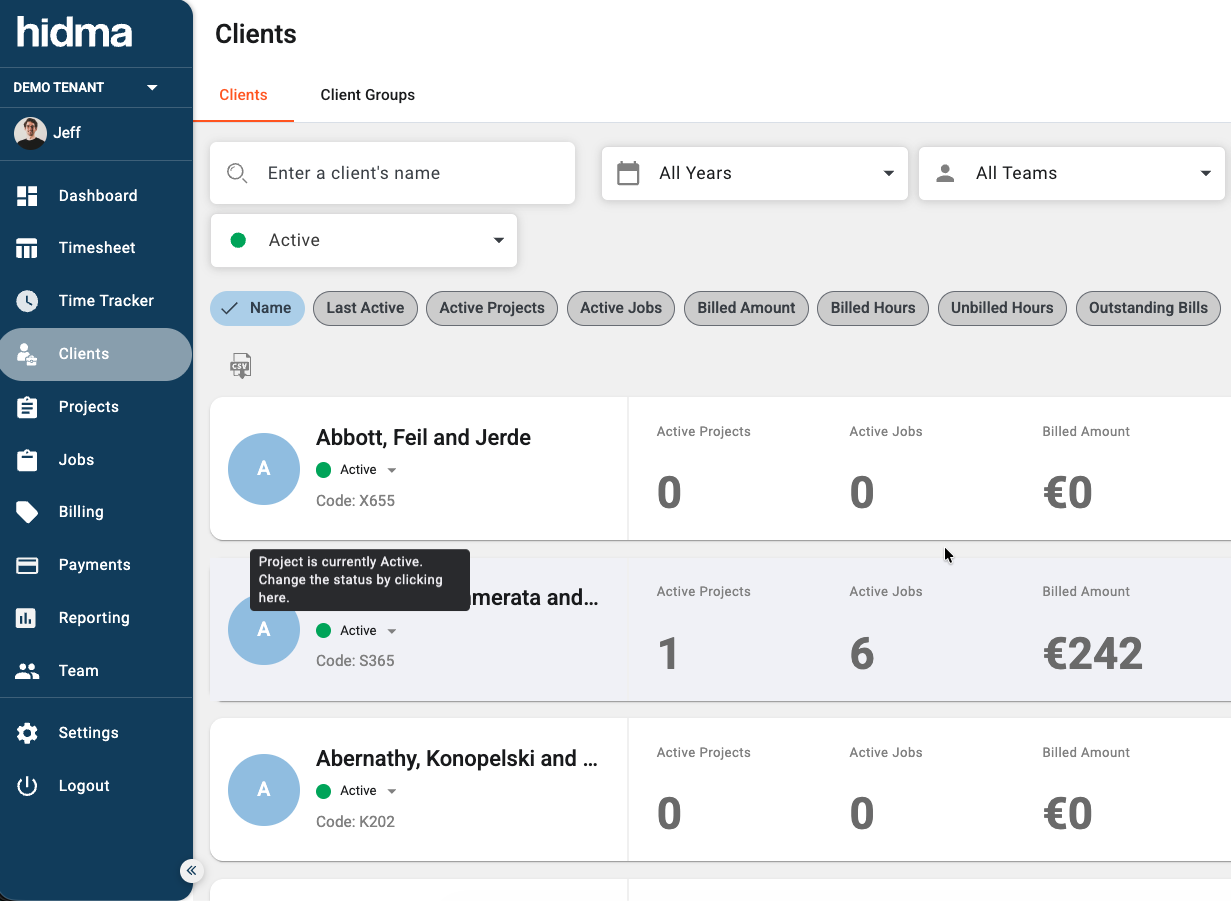
The change is saved immediately — there's no separate Save step. The dot colour updates to reflect the new status.
The status indicator is everywhere
The same clickable indicator appears on project cards and project dashboards too, so you can change a project's status the same way. See Project Status for details.
Filtering by Status
Use the status filter at the top of the Clients list (next to the search box) to switch between viewing Active and Inactive clients. This makes it easy to focus on current relationships or to find a client you previously deactivated so you can reactivate them.
Related Topics
Have questions? Visit our FAQ or contact [email protected]